The Combo — the interface if we go Workbench (1) + Graft (3)
Screen 1 — Jobs home (the front door)
Active jobs
TL-1016-93 split60MSO7, 0.125"
JordanNest: 1 gap flag open
TL-1016-86 split60MSO7, 0.125"
—Post blocked: part-tab width missing from material table
novi signMSO7, 0.125"
—Heal: 2 open contours
ring 2" OD × ½" IDMSO7, 0.125"
Aristidedrawn from scratch — born clean, Heal auto-passed
New job:
Browse folder…
Drop files — DXF · DWG · AI · PDF · SVG
Blank document — draw from scratch
"My customer says: I don't have a print. Can you just give me a 2-inch OD with a 0.5-inch ID?" — two dimensioned circles from a blank doc, then the normal workflow.
Machine
Laser 1 — bed 80 × 160 · loaded: MSO7, 0.125" · envelope check runs on every file
Material table — beam comp, kerf, lead length, tab widths per material × thickness. A missing number BLOCKS the stage that needs it (see -86 above) — never a silent fallback.
Licensing — runs fully offline; if licensing ever hiccups the software keeps cutting. Nothing may idle the laser.
Screen 2 — Heal (dock ground state)
Import
Heal
QC
Review
Nest
Cut Plan
Post
Deliver
⇱
✎
✂
⤢
🔍
RE-FIT
HEAL
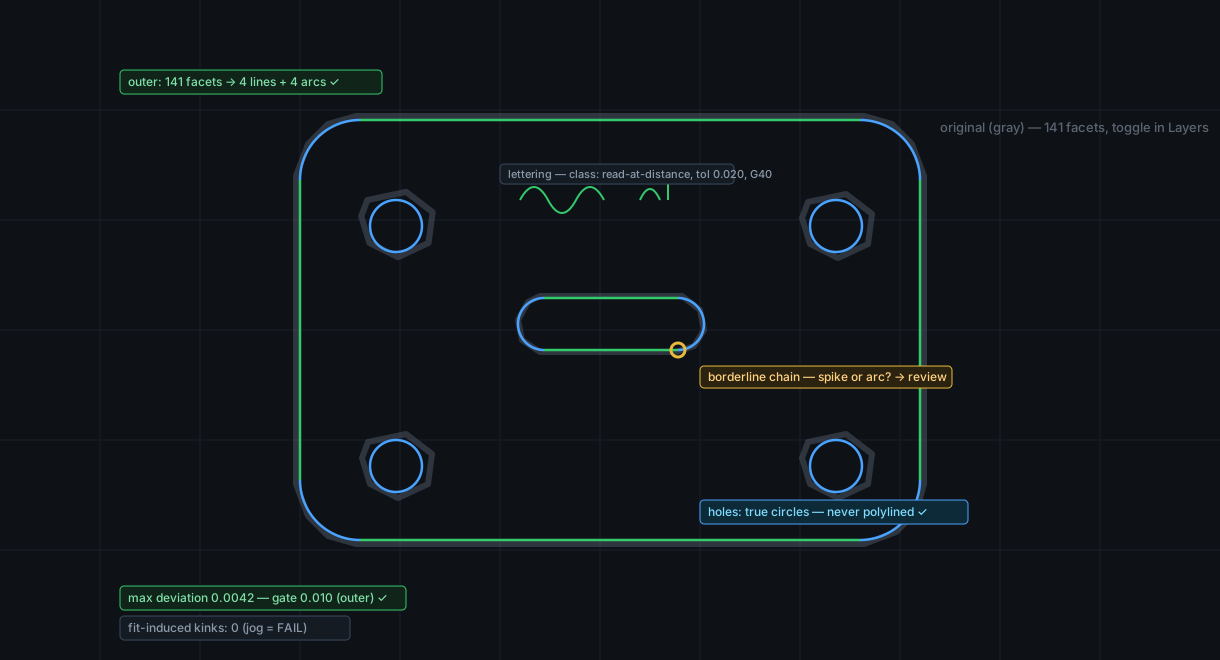
Layers: ■ healed · ▣ original (gray)
⣿Heal checks⇱ docked
units detectedinch
facets → primitives141 → 4 lines + 4 arcs
native arcs preserved12 / 12
max deviation0.0042 (gate 0.010)
fit-induced kinks0 (jog = FAIL)
⚠ 1 borderline chain — spike or arc? review it
⣿Tolerance by feature class⇱ docked
the feature's function sets the gate — drag to override, geometry re-fits live
▤
▥
▥
Screen 3 — Nest (one panel torn off to monitor 2 — the graft at work)
Import
Heal
QC
Review
Nest
Cut Plan
Post
Deliver
⇱
⟳
▦
⤢
🔍
AUTO
draft
draft
NEST
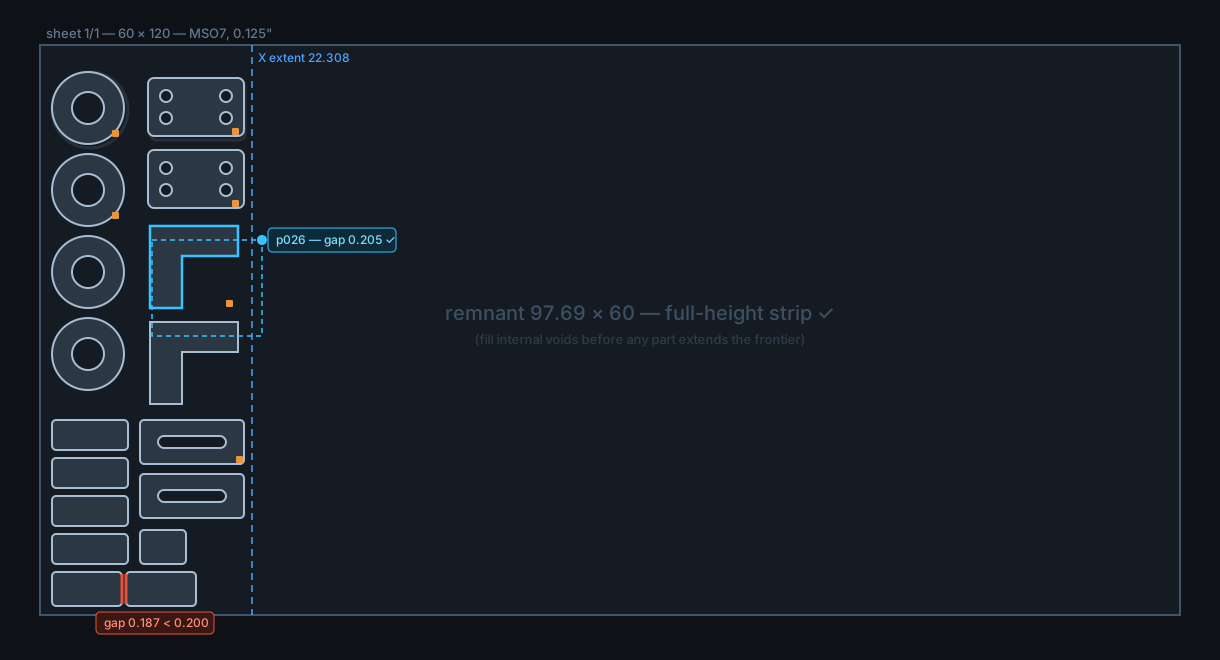
Layers: ■ healed · ▣ original (gray)
monitor 2 (this workspace): Nest controls · Parts table — torn off, remembered per user; ⇱ snaps them home
⣿Nest checks⇱ docked
parts placed41 / 41
min part gap0.205 (floor 0.200)
X extent / remnant22.308 / 97.69 full-height
arcs preserved100% — 0 polylined
objectiveminimum X — voids before frontier
⚠ p012 ↔ p017 gap 0.187 < 0.200 — zoom
Auto-nest draftRepeat × 20 sheets
⣿Nest controlson monitor 2 — snaps back here
▤
▥
▧
▥
▧
Job log & cut-order timeline
14:02 auto-nest draft placed 41 parts in 3.8 s
14:05 Jordan moved p019, p026 into internal void — X 23.273 → 22.308, checks re-run ✓
Screen 4 — Cut Plan (order, leads, pierces, tabs)
Import
Heal
QC
Review
Nest
Cut Plan
Post
Deliver
⇱
↻
⚑
▶
🔍
AUTO
leads
leads
CUT
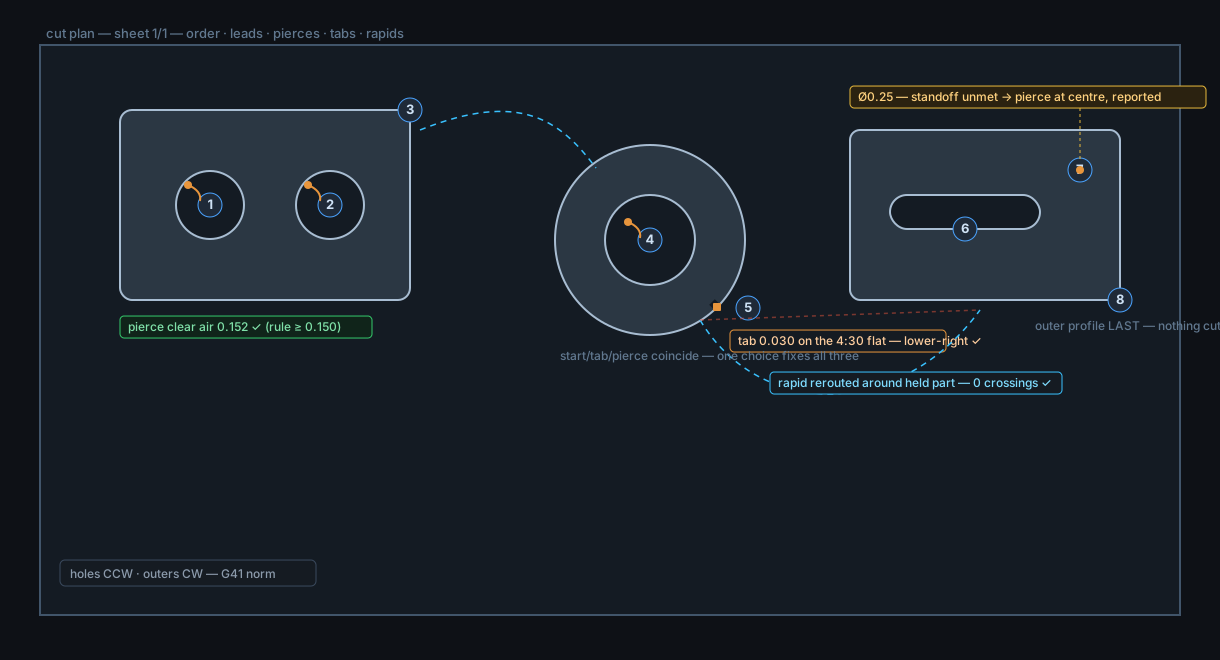
Show: order · leads · rapids · sim ▶
⣿Cut plan checks⇱ docked
leads auto-placed8 / 8 — every one grabbable
pierce clear airmin 0.152 (≥ 0.150)
part tabs0.030 flats, lower-right
slug tabstable 0.018 / 0.033
outers lastall parts
rapids over held parts0 (1 rerouted)
compG41 norm · G40 declared on art
⚠ Ø0.25 hole — standoff unmet, pierced at centre — on the shop sheet
⣿To Post⇱ docked
audit vs sourceruns on every posted NC
beam comp gatematerial table, blocks if missing
Post G-code →Slug report CSV
▤
▥
▥
Where every research finding lives in this interface
| Finding | Where it lives above |
|---|---|
| 1 — learnable, visual, visible improvement cadence | Status tab strip readable across the room; checks drawn on the geometry; "What's new" chip on Jobs home — the improvement cadence is shown to the user, which is half of why LightBurn won. |
| 2 — everything in one app, live sliders | Import → Deliver is one tab strip, no round-trips; tolerance and spacing sliders re-fit/re-check live on the canvas. |
| 3 — usability beats feature count | V1 scope rule: ship the eight tabs solid before any exotic feature; the dock ground state keeps every workstation identical and learnable. |
| 4 — reliability/interoperability failures are what kill | Import accepts DXF · DWG · AI · PDF · SVG; everything delivered is MetaCam-safe; no live machine link to lose — we hand the control a file it already speaks. |
| 5 — geometry fidelity is a hard gate | "Arcs preserved — 0 polylined" is a standing gauge on Heal AND Nest; circles stay circles all the way to G2/G3. |
| 6 — auto-nest distrusted, manual override non-negotiable | AUTO is labelled draft; dragging a part is the primary gesture with a live gap chip; Jordan's void-filling moves are the designed-for workflow. |
| 7 — repeatable nests for floor rhythm | "Repeat this nest × 20 sheets" one click from the auto-nest button. |
| 8 — automate the tedious, keep fine manual control | Leads, tabs, order all auto-placed ("nearly instant") and every one a grabbable marker on the geometry. |
| 9 — general CAD pressed into nesting is a nightmare | The whole tool is purpose-built for this pipeline; nesting is a first-class stage, not a bolted-on script. |
| 10 — licensing must never idle the laser | Policy card on Jobs home: fully offline-tolerant; a licensing hiccup can never stop cutting. Pixels can't fix this one — it is a company promise, recorded here so it ships as one. |
What stays open
This drawing assumes the 1+3 pick is real — say so and it becomes the recorded panel-layout decision (closing the question from /design/look/). Still open regardless: draw-from-scratch v1 scope (screen 1 shows the ruled requirement, not a scoped design), visual styling (dark theme and icons are placeholders), and everything downstream of the definition phase — these stay drawings until the phase rule says build.